Showing posts with label Gadgets. Show all posts

Monday, 30 March 2015

Fitness wristbands


culled from:pulse.ng


Kaspersky Lab researcher, Roman Unuchek, has examined how a number of fitness wristbands interact with a smartphone and discovered some surprising results.
According to Unuchek’s research findings, the authentication method implemented in several popular smart wristbands allows a third-party to connect invisibly to the device, execute commands, and – in some cases – extract data held on the device.
In the devices investigated by Unuchek, such data was limited to the amount of steps taken by the owner during the previous hour.
However, in the future, when next-generation fitness bands capable of collecting a greater volume of more varied data appear on the market, the risk of sensitive medical data about the owner leaking out could raise significantly.
The rogue connection is made possible because of the way in which the wristband is paired with a smartphone.
According to the research, an Android-based device running Android 4.3 or higher, with a special unauthorised app installed can pair with wristbands from certain vendors.
To establish a connection, users need to confirm the pairing by pressing a button on their wristband. Attackers can easily overcome this, because most modern fitness wristbands have no screen.
When the wristband vibrates asking its owner to confirm the pairing the victim has no way of knowing whether they are confirming a connection with their own device or an intruding connection.
Unuchek adds that: “Of course, there are more harmful actions that are more likely. For example, by using a Trojan-Ransom the fraudster could take control of your wristband, make it vibrate constantly and demand money to make it stop.”
“This Proof of Concept depends on a lot of conditions for it to work properly, and in the end an attacker wouldn’t be able to collect really critical data like passwords or credit card numbers. However it proves that there is a way for an attacker to exploit mistakes left unpatched by the device developers.”
Unuchek further states that: “The fitness trackers currently available are still fairly basic, capable of counting steps and following sleep cycles, but little more than that. However the second generation of such devices is almost here, and they will be able to gather much more information about users. It is important to think about the security of these devices now, and ensure that there is proper protection for how the tracker interacts with the smartphone.”
Unuchek advises that users of smart wristbands, who are concerned about the security, check with the wristband’s vendors whether such a potential attack vector would be possible on their product.

Friday, 27 February 2015


by Jessica Stillman

culled from:http://www.inc.com
These tech tools promise to deliver everything from a calmer mind to more good karma.
The things you can accomplish with an app these days are truly impressive. With a couple of taps on your smartphone a taxi will pull up at your door, a tasty dinner appear on your table, or your dirty socks transform into neatly folded clean laundry. These feats can mightily improve your quality of life, sure, but can technology go deeper, addressing not only your material needs but boosting your mood as well?
That's what a whole range of apps designed to help make you happier claim. On blog Shareable recently, Cat Johnson rounded up a hefty 15 entrants in this category. Some serve specific niches such as couples, while others are more geared towards improving physical health (or sleep habits) as a way to improve mood, but others are intriguing tools that entrepreneurs hoping to be a bit happier might want to check out.

1. Gratitude Journal

"Something as simple as writing down three things you're grateful for every day for 21 days in a row significantly increases your level of optimism and it holds for the next six months," Harvard's Shawn Achor previously explained to Inc.com. That's scientific backing for the idea behind Gratitude Journal ($1.99), which as the name suggests, helps you boost your happiness by keeping track of all the good things in your life.

2. Calm

Don't have the cash to jet away to some nature retreat and clear your mind? There may be a way to calm down free of charge--just download aptly named app, Calm. "Featuring guided meditations, nature sounds, and a step-by-step guide to finding that all-too-elusive peace of mind, Calm is a great app to reach for when the fast-paced world gets a bit too much," explains Johnson.

3. Headspace

You need to hit the gym to keep your body in shape, so why do you think your mind will work its best without a workout? That's what Headspace provides, offering "tons of content focused on creativity, decreasing stress, increasing happiness, conscious eating, and open-hearted living."

4. Mindfulness

Whether you're a newcomer to meditation or an expert with a long-standing practice, app Mindfulness has something to offer you, including a timer for meditators and guided meditations. A clearer mind will cost you $1.99.

5. Happy Habits: Choose Happiness

Meditation isn't the only route to a healthier mindset and a happier life. You could also harness the insights of psychological science with this free app. Based on cognitive-behavioral therapy principles, Happy Habits offers tools "to assess your happiness, audio guides for relaxing and creating happiness, a journal for affirmations, a Happy To Do list, and graphs to keep track of your happiness levels." It's free.

6. Mood Kit

This is another app based on psychological insights. For $4.99 Mood Kit claims to help "you discover unhealthy thought patterns and behaviors so you can recognize them and ditch them," writes Johnson.

7. Pay It Forward

One of the surest ways to feel better yourself is to do something nice for someone else. Pay It Forward is a tech tool designed to encourage you to do just that, sending daily suggestions for small acts of kindness, as well as offering features to track and share your good deeds (in case good karma isn't motivation enough). Cost: $0.99.
Do you think an app can really make you happier?

Thursday, 19 February 2015


8 Tools That Can Make Employees More Efficient


Contributor
culled from:http://www.entrepreneur.com
As we move further into 2015, being more efficient is, rightly, a top priority for many business owners. Not only do they themselves want to be more effective, they want their staff to be more efficient as well.
When it comes to this pursuit, having the right tools can make or break your ability to work effectively and to promote these behaviors in your staff. Here are eight great productivity tools you’ll want to take a look at this year:

Employee communication

Employee communication is a big area of inefficiency in most businesses, where email can take up as much as 28 percent of employees’ time. Social networking and communication tools can make a big difference in this area, freeing up significant time for other tasks.
Related: 13 Cool Web Tools to Help You Stay Connected With Your Team

1. HipChat

hipchat app
Image credit: Hipchat
HipChat is a team chat tool that allows private communication and file sharing. Individual users can participate in several chats at the same time, allowing staff to work on multiple projects and to conduct private conversations as needed. Chat records generated by the program are searchable, and the tool also allows screen sharing and video calls. In addition, security features keep your companies communication safe from outside access. Best of all, the app’s pricing is very affordable, with all features available for $2 per user per month.

2. Zula

Zula is the new kid on the block in collaborative chat, having debuted at the 2013 TechCrunch Disrupt event. Zula focuses on collaboration on the go, using a native mobile-only platform that allows for communication through text, rich media, file sharing and conference calls. The team behind Zula continues to raise millions in funding to support its early-stage launch, resulting in plenty of buzz of being the next big thing in employee productivity.

Online scheduling

Whether you need to schedule your staff’s hours or your customers’ appointments, the following tools can help:

3. When I Work

I might be a little partial to this one, but when it comes to helping managers schedule staff hours more efficiently, you can’t go wrong with When I Work. Requiring minimal data entry, this web-based scheduling interface allows staff to stay connected to their schedules, whether they’re in the office or at a remote location. You can even fill missed or vacated shifts by sending interested employees a mobile notification that allows them to fill the spot with the click of a button.

4. GenBook

GenBook app
Image credit: GenBook
Well established in the small business scheduling space, GenBook currently schedules over 650,000 appointments a month for business owners. GenBook's pricing is based on the number of staff supported, with plans starting from just one to six users. In addition to scheduling, GenBook allows your company to offer special promotions, connect these advertisements to your company’s social profiles, and even track customer analytics. With GenBook, your staff can focus on providing services, while you focus on expanding your marketing campaigns and measuring your business results.
Related: 5 Tech Tools that Help Businesses Compete With the Big Guys

Password management

Managing passwords is a pain for nearly everyone, but keeping passwords memorable often results in poor security. The two tools below will help you improve your security, while keeping your staff focused on their work, rather than worrying that they’ll lock themselves out of the system if they get their passwords wrong one more time.

5. LastPass Enterprise

LastPass is a highly-secure program that automatically generates and stores complex passwords. The program combines password vaulting with cloud SSO capabilities, helping you to protect company data, manage your password policy, and optimize your employees’ productivity. With a variety of security tracking features, LastPass allows your employees to stop worrying about passwords and start focusing on their work.

6. Lieberman Enterprise Password Manager

This security tool is aimed at IT departments, where access to privileged accounts and shared administrative access to Windows and Linux servers can compromise security. The Lieberman Password Manager finds and strengthens server passwords, encrypts them and stores them in a database. Not only does it create complex passwords that staff don’t need to memorize and support common multi-factor authentication tools, it’s surprisingly easy to maintain once installed.

Project tracking and collaboration

Many employees rely heavily on email and phone calls when they’re working with a project team. However, endless threads and out-of-sequence responses cause confusion, mistakes and diminished productivity. These two project tracking and collaboration tools will go a long way towards making your team more efficient.

7. Producteev

A powerful task and team management tool, Producteev organizes workflows into networks, projects and tasks, as well as allowing followers of specific tasks to receive updates as their status changes. The company has also provided apps for most popular mobile devices, giving teams the ability to work on-the-go. Producteev is free for an unlimited number of users and projects, although businesses looking for Outlook integration and a higher level of support can upgrade for $99 a month.

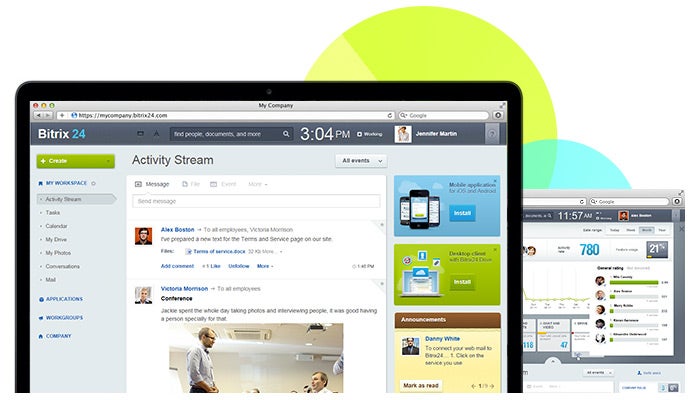
8. Bitrix24

Bitrix24 app
Image credit: Bitrix24
Bitrix24 is an intuitive workspace that enables collaboration via chat, video, documents and phone calls initiated from within the application. In addition, the program comes with a customer-relationship management contact database, making it a “one stop shop” for many teams. Bitrix24 is free for up to 12 team members, with additional staff and features available at two higher-tier subscription levels.
When it comes down to it, having the right tools at your disposal makes all the difference in terms of employee efficiency. With some or all of these eight tools on deck, your team will be well on its way to a very productive 2015.
What productivity tools does your team use to maximize efficiency?

Tuesday, 10 February 2015


culled from:http://www.forbes.com
No matter what profession you’re working in, efficiency matters.  Being able to get more done in less time is the key to getting ahead — whether you’re looking for a big promotion within your traditional corporate job or hoping to take your growing startup to the next level.
Fortunately, with the number of tools on the market today, there’s never been a better time to take advantage of the online resources that will help you to increase the amount you’re able to accomplish.  The following are just a few of my favorites:
Tool #1 – Yast
There are plenty of different time-tracking tools out there, but Yast is one of the best, by far.  Its intuitive interface is easy to understand and simple to use, making tracking your time less of a chore and more of a business priority.
For best results, though, don’t just use this tool for business.  Use it to track how much time you’re spending on unimportant tasks (e.g. goofing around online or watching TV at home) in order to “split test your life” and become more efficient overall.
Tool #2 – Bitrix24
For some reason, Bitrix24 isn’t widely known — and I think that’s a shame.  The program combines a social intranet system with CRM tools that include contact tracking, sales funnel management, messaging, activity planning and calendars, all of which enable your team to quickly manage important pieces of information from within a central program.
Best of all, it’s free for teams with fewer than 12 people (subscription plans for larger groups are modestly priced as well).
Tool #3 – Trello
I’m not sure where the word “Trello” came from, but its definition should be, “project management simplified.”  Combining elements of both Pinterest and Basecamp HQ, Trello allows users to create project boards and easily manage the people and resources associated with each task.
Plus, despite its simplified, easy to use system, Trello is still free for use by teams of all sizes.
Tool #4 – Sanebox**
Unsurprisingly, Sanebox performs the exact task described in its name: it restores some sanity to the clutter of your inbox.  Once installed, the program automatically filters newsletters and other lower-priority email messages into a “Read Later” folder, ensuring that only priority communications reach your inbox.
Currently, the program runs for $55/year (with monthly and two-year subscriptions available as well), though you can take advantage of a 50 percent discount by allowing the company to post a few messages to your Facebook account.  However, even if you aren’t comfortable with this, the roughly $5/month you’ll spend to install Sanebox is more than worth the time saved sifting through unimportant email messages.
(**Pro tip: If you run the Chrome browser, use the Baydin Email Game plugin to clean out your inbox before installing Sanebox.  Using the two tools together doesn’t just make “Inbox Zero” a possibility, it makes it fun to reach as well!)
Tool #5 – WriteMonkey
If you’re working on a writing project that requires your complete focus, you need the WriteMonkey program.  Once activated, the tool transforms your computer into a full-screen writing environment that blocks out the distractions of standard computer interfaces.  Not only is it free to use, it’s highly customizable, allowing you to set the color schemes and options that make you as productive as possible.
Tool #6 – LastPass
It’s no secret that password management is an extremely important priority for business people – especially considering the recent hacking of Wired Magazine’s Mat Honan.
However, coming up with and remembering the hundreds of strong, secure passwords needed to manage multiple logins is inefficient and often downright impossible without a password management program like LastPass.
LastPass is a highly secure, free program that will automatically generate and store secure passwords, enabling you to create nearly un-hackable logins that are served up by the program whenever you need to login to a website.  And while there are plenty of programs offering this functionality on the market today, I prefer LastPass for its mobile integrations (though you’ll need to upgrade to the $12/year premium subscription) and its range of multi-factor authentication processes (which protect your password data even more).
Tool #7 – HipChat
Finally, one area of efficiency that all organizations must consider is the amount of resources dedicated to internal communications.  Holding meetings takes time, while distributing memos requires paper — and if someone important is left out of the initial communication, both time and resources are wasted getting this person up to speed.
To eliminate these issues, we use the HipChat utility at Single Grain.  It’s a private chat tool that allows us to create chat rooms for groups of users, send private messages between individual teammates and even share files that pertain to ongoing discussions.  At only $2/user, per month, it’s an effective way to ensure that our projects are managed as efficiently as possible.
Obviously, these seven tools represent only a handful of the efficiency products that are available online today.  If you’ve got another recommendation that’s made a difference in your organization’s productivity, share your thoughts in the comments section below!

Wednesday, 28 January 2015


8 Ways To Improve The Wi-Fi Capabilities In Your Laptop

.
 culled from:http://tweakyourbiz.com
.
#1. Upgrade your wireless hardware: Recent laptops are equipped with 802.11g or 802.11n Wi-Fi circuitry and if your router is an 802.11b device that is the speed that you will receive. Therefore, upgrade your wireless hardware so that it matches the capabilities of your laptop. Nowadays, with the increasing capabilities of the wireless connection, the price of the wireless equipment like any other technology have invariably gone down.
#2. Expand or repeat the Wi-Fi signal. To add more strength to the connection a wireless amplifier, also called a repeater or range expander, can be an advantage that picks up signals from the router and then retransmits it. To make the best use of the wireless amplifier place it somewhere near the edge of the existing signal. The device then rebroadcasts the signal to cover other areas for the connection.
#3. Upgrade the standard antenna of the router from the omnidirectional design. The significance of the Omni antenna is to provide a signal in all directions. This directional signal allows you to target the location where you want the signal. However, check with the manufacturer or electronic suppliers to learn more information about purchasing a replacement antenna.
#4. Install an external adpater. If you want to boost the capabilities of your older laptop’s wireless hardware, simply disable its built-in Wi-Fi circuit and antenna and install an external adapter.  This usually comes with a large antenna and uses the up-to-date technologies. You can plug the external Wi-Fi devices directly into your laptop’s USB port or attach to it by a cable.
#5. Change your wireless channel for firmware. Wireless signals get broadcast on several channels. If one channel seems to provide a lot of interference change the channel through the router or access point’s configuration settings. However, if the problem still persists, completely reconfigure the router or access point using Linux based firmware or a DD-WRT program. But make sure that the equipment is compatible with the new firmware.
#6. Reposition your equipment for better Wi-Fi capabilities in your laptop. Try to place your router or access point in a central location, preferably where the signal will not be congested by thick walls or obstructing furniture. Also avoid placing your router or access point near any metal surfaces. Metals interfere with the signal broadcaster.
#7. Check transmission power settings – as some network adapters support the connection by adjusting their transmission power.  This setting can be adjusted through the adapter’s driver interface program with other wireless profile settings and Wi-Fi channel number. To ensure the strongest signal possible set the transmission power to maximum or 100%. However, if your laptop is being run in a power saving mode, this setting will automatically decrease the adapter’s range and signal strength
#8. Disable the network hogs that run in the background. Always check how many apps are running in the background of the normal user’s laptop. It is no surprise that background tasks can be the cause of a slowdown. Disable unused applications or notifications to maximize primary task speed.

Wednesday, 21 January 2015


culled from:wikihow.com

Steps

Use a Cell Phone Step 1.jpg
1
Research the local providers in your area. This depends on your region and includes numerous brands. Look at different service contracts.
  • How many minutes are offered per month? How much does it cost to go over the maximum?
  • What features are available? What services cost extra?
  • Is coverage and service available in the area where you live and areas where you travel regularly?
  • How long is the initial contract? Does it include a phone, or will you purchase that separately?
    • that separately?
    Ad
  1. Use a Cell Phone Step 2.jpg
    2
    Consider using your local phone company and adding the cell phone to your home phone bills and see if there are any discounts. Otherwise, find a company with the features you like, make sure their service is good in your area, and try to get a company your friends have because many offer free mobile to mobile minutes which could be helpful.
  2. Use a Cell Phone Step 3.jpg
    3
    Purchase a cell phone and associated plan. If you have bad credit or you simply want to try having a cell phone without signing up for a long contract, you may want a prepaid or pay-as-you-go plan.
  3. Use a Cell Phone Step 4.jpg
    4
    Gather up a list of numbers of people you talk to on a regular basis.
  4. Use a Cell Phone Step 5.jpg
    5
    Input these numbers with the number keypad. If they are out of the area code you are in, add their area code. Your phone should come with a manual with specific details on how to input numbers.
  5. Use a Cell Phone Step 6.jpg
    6
    Dial numbers directly. If you know a number, you can punch it in. Some cell phones "know" what area code they are in, so dialing a "1" may not be necessary.
  6. Use a Cell Phone Step 7.jpg
    7
    Choose or dial the number and push the "send" or "call" button (often indicated with green lettering or symbols). This starts the call. Proceed as with any other phone call.
  7. Use a Cell Phone Step 8.jpg
    8
    End the call by pushing "end" (often indicated with red lettering or symbols). Calls will usually end automatically after the person you spoke to hangs up, but it's best to get into the habit of hanging up, especially since calls are billed by the minute.
  8. Use a Cell Phone Step 9.jpg
    9
    Read your user manual for specifics to your phone and plan. Even if you don't read the whole thing, learn how to:
    • check your messages
    • return a call
    • add a phone number to your phone both manually and after someone has called you
    • send and receive text messages (optional). Keep in mind that text messages cost extra in many plans
  9. Use a Cell Phone Step 10.jpg
    10
    Charge your phone regularly by plugging it in with a charger.
    • Car chargers are available that plug into the cigarette lighter, but most only work when the car is turned on and running.
    • Most phones have a battery life indicator and will beep or alarm when the battery is very low.

2014-06-11-cellphoneparisfull.jpg


culled from:huffingtonpost.com
Traveling internationally without a data plan can be intimidating -- especially in a world where we're constantly using our phones to Yelp restaurants or make our way via Google maps. But while it seems easy enough to just pick up the phone and dial (or, if we're being honest, upload those photos to Facebook or Instagram), international roaming fees and data charges can add up quickly.
So to keep your friends and family updated while you're on the road (or just to make sure everyone's reading your tweets), here are our tips for avoiding international fees while staying connected:
Consider purchasing an international phone plan
If you try to use your U.S.-based phone internationally, you're likely to be charged high roaming fees for accessing data and making calls. Check with your provider to see if your current plan allows for international calling. If it doesn't, activate international calling, rent an international phone or purchase an unlocked phone (with an international SIM card) for use on your trip. Keep in mind that an international phone plan is most useful when you plan to travel for an extended period of time.
Check voltage and converter requirements
The last thing you want to do is blow a fuse and ruin your smartphone when you're trying to charge it, so make sure to read up on your destination's voltage requirements and outlets before purchasing an adapter. If you plan to visit multiple countries, Amazon is a great place to find inexpensive universal adapters and converters.
Turn off data usage
Reduce data roaming charges by updating your settings to check for email and wireless connections manually, rather than automatically. That way, you can check and send emails when it's convenient (e.g., when you're using free Wi-Fi at the hotel). Alternatively, you can keep your phone in "airplane mode" when you don't need Wi-Fi to help prevent your phone's battery from draining too quickly.
Take advantage of free messaging platforms
The increase of international travel means that companies are finding new ways to keep us connected through a simple Wi-Fi connection. If you plan on using a laptop, Skype is great for messaging and voice calls. Want to text your friends from abroad? Free apps like WeChat and WhatsApp allow you to send messages (and photos and stickers!) over Wi-Fi.
Look out for free Wi-Fi
Most hotels offer free Wi-Fi for at least 24 hours -- check with the front desk to see if they have a username and password that can use to access it. Increasingly, cafes and restaurants also offer free Wi-Fi and will happily give out the password if you ask.
Use a prepaid phone card
If you definitely plan on making phone calls to loved ones back at home, one of the easiest things to do is purchase a prepaid phone card. You can find them at gas stations and local tobacconist shops, and it'll allow you to make calls from a local landline or pay phone in the country you're visiting.

Thursday, 15 January 2015


culled from:http://mashable.com

8d7ac413

1. The Touchfire

iPad users know the frustrations that come with typing long emails and meeting notes on their device, but some concepts such as the Touchfire -- which raised almost $100,000 on Kickstarter -- can make the process a lot easier. This lightweight and thin overlay goes over the iPad's screen, so it feels more like a keyboard. In fact, the defined keys make it actually easy to look away from the screen when typing. It also lives in the iPad cover, so it folds into the cover when you don't want to use it. Ah, tablet typing made easy.


1cc3714d

2. The AudiOffice

The AudiOffice by Invoxia -- which features a dock equipped with speakers for devices such as the iPhone, iPod and iPad -- works along with apps such as Skype and FaceTime. This combination allows businesses to communicate with others via video chat and cuts down on communication costs. The unit also takes being tied to a traditional computer out of the equation.


 Aef887cf

3. Seagate External Hard Drive

Seagate drives for PC deliver easy-to-use, flexible protection for all your files -- including photos and videos from your social media accounts. This is also key for anyone who travels with an iPad and wants to access music, movies and more while on the road.


 6c1a4fea

4. Samsung 830 SSD Series

The Samsung 830 series may be about a year old, but it's still considered one of the best reviewed SSDs on the market. This slim solid-state drive boasts super-fast speeds -- up to 80,000 IOPS -- and can take web browsing, gaming and more to the next level. Mashable's Christina Warren has used the 830 for almost a year in her MacBook Pro and says it was the best tech investment she's ever made. Overall, if you are in the market for speed, Samsung's 830 series is worth the investment, especially if you have a more modern machine.


 0d7d7bd0

5. Parallels

If your business is among the many that supports both Windows machines and Macs, desktop simulators such as Parallels and VMware Fusion can help get all your computers running the same apps. For example, Parallels lets you run Windows on your Mac, and the trick is you can run both operating systems simultaneously, with your Windows apps showing up just like Mac apps would. Version 8 supports Mountain Lion features, such as dictation and notifications, for Windows apps.


 51b11c35

6. Mophie Juice Pack Air

No one likes to carry around a phone charger, and similarly, there's nothing worse than watching your mobile device's battery slip away, especially when you're traveling for business. Thanks to smartphone cases with built-in batteries such as the Mophie Juice Pack Air ($79.95), it nearly doubles your battery life and is much more lightweight than other battery cases.


 637b0f77


7. Steadicam Smoothee

Video rigs such as the Steadicam Smoothee for the iPhone ($149) is a worthwhile investment, allowing small businesses to shoot video clips on the go with ease. Think of it as a table-top tripod.


Wednesday, 14 January 2015


122914 samsung chip

culled from:http://smallbiztrends.com


Samsung is set to make mobile devices bigger, faster, and more brilliant in the very near future. The company announced that it has begun mass production on the very first 8-gigabit LPDDR4 Mobile DRAM mobile memory module.
The new chip marks a new benchmark for mobile devices aimed at being the best. In fact, Samsung’s innovation means the best mobile devices likely will have more memory than a lot of laptops and desktop computers.
The new era of 4GB mobile DRAM will have other obvious impacts on the kinds of mobile devices we’re likely to see in the near future.
In a post on Samsung Tomorrow, the company’s official blog, Joo Sun Choi, Executive Vice President of Memory Sales and Marketing at Samsung Electronics, explains:
“By initiating production of the 20nm 8Gb LPDDR4, which is even faster than the DRAM for PCs and servers and consumes much less energy, we are contributing to the timely launch of UHD, large-screen flagship mobile devices. As this major advancement in mobile memory demonstrates, we will continue to closely collaborate with global mobile device manufacturers to optimize DRAM solutions, making them suitable for next-generation mobile OS environments.”
Only the best mobile devices on the market today can offer 3GB DRAM. But with 4GB of mobile DRAM, it looks as if ultra-HD video on mobile devices will be the norm. And this also means larger mobile devices with better quality images.
Samsung says that its new memory innovation enables users to capture ultra-HD video from mobile devices, as well.
In addition to being 50 percent more powerful than the fastest LPDDR3 or DDR3 memory available, the new Samsung chip uses 40 percent less energy too.
And Samsung’s influence will likely be seen in a lot of other companies’ high-end smartphones and tablets released this year, Electronista reports. The company supplies other manufacturers with its memory technology as well.
In another post from the company blog, Samsung’s Memory Sales and Marketing vice president Young-Hyun Jun adds:
“We will continue introducing the most advanced mobile DRAM one step ahead of the rest of the industry so that global OEMs can launch innovative mobile devices with exceptional user convenience in the timeliest manner.”
Samsung will likely unveil the first devices with 4G of mobile DRAM in early 2015.

Tuesday, 13 January 2015


culled from:http://www.wonderslist.com

We are living in 2012. An era in which technology is at its best. Every day, Technology inventions keep us amused. No doubt that technology made our lives much easier and better. These tech wonders entertain us, help us, and care us in every field of life.
Here we are presenting you Top 10 Must Have Gadgets for everyone.
Samsung Galaxy S III
Top 10 Must Have Gadgets
Samsung announced his much awaited galaxy S III in this year with a display of 4.8” HD Super AMOLED (1280×720) display. This cell phone is equipped with 1.4 GH quad core processor, 8 MP camera and latest android OS 4.0 (Ice cream sandwich) upgradeable to 4.1 (Jelly Bean).This is the best cell phone ever with some amazing features. You must have it if you are a tech lover.
New iPad
Apple New iPad
Apple announced its new iPad (iPad 3) in this year also. “This is brilliant, in every sense of the world” that’s what Apple says. Main feature of this generation of iPad is its retina display. You will definitely fell in love with its amazing display. This gadget has A5X chip with quad core drivers. 5 MP iSight camera to capture your memorable moments with full 1080p HD video recording. It also has the world most advanced OS iOS 6 with talking assistant Siri. Give a try to Apple new iPad. I am sure you will get addicted to this.
MacBook Pro (With Retina display)
Advertisement
“You have never seen anything like it because there is never been anything like it” well Apple said it right. A Retina display with 5.1 million pixels and Quad-core Intel Core i-7 processor makes MacBook Pro is an amazing gadget. This notebook has the highest resolution display ever. It comes in two sizes 15” and 13”.  It is equipped with OS, X Mountain Line. It also has 7-Hour battery life. So you want a notebook with some amazing display, high performance and remarkable battery life, try MacBook Pro. I hope it will never let you down.
iPod nano
iPod nano
Famous play writer Shakespeare once said “If Music is the food of love, Play on”. And for that you need a music player. iPod nano is the best gadget to fulfill this need. iPod nano support both audio and video formats. It has an immense Playback time when fully charged with 30 hours on audio and 3.5 hours on video. It also tracks your daily life activities with an amazing app Nike+. It is a cheap and superb gadget for music lovers.
Beats by Dr. Dre (Headphone)
dr dre beats pro
Powerful distortion free audio performance with deep bass response is the main quality of Beats which give this gadget a prominent place among its competitor. As its websites states, they made this outstanding gadget after the research of 25 years. This Bluetooth enabled headphone is a really comfort for ears. A little pricy but a must have gadget for music lovers.
Nikon D7000 DSLR
Nikon D7000 DSLR
If you like photography, try Nikon D7000 DSLR. With 16.2 MP it has some amazing features. It is GPS enabled. You can save coordinates of any picture taken by this camera. It also record movies in 1080p. It has 2 storage slots so you will never face any storage issue. Nikon D7000 is a great stuff for photographers.
 XBox 360 with Kinect
 XBox 360 with Kinetic
Microsoft has totally changed the concept of digital gaming. If you have Xbox 360 purchase Kinetic and enjoy the awesomeness of this gadget. It judges your movement and perform same thing. It will provide you exercise in a fun way.
Sony-KDL-55HX853
Sony-KDL-55HX853
The KDL-55HX853 new LED 3D TV by Sony is fashionably thin, only 3.5 cm. The TV offers four HDMI inputs, Scart, component, phone stereo, PC, two USB inputs, Ethernet and a CAM slot. Wi-Fi is built-in and there’s a Wi-Fi direct mode for direct connection with local devices. You can enjoy the cinema entertainment at home. Watch a 3D movie with friends or family and has super fun.
Sonos Subwoofer
Sonos Subwoofer
Soul shaking sound, Heart pounding design, and wireless with one button setup are the main qualities of Sonos Sub. You can place it anywhere in the room even lying flat under couch.
iMac
iMac
The all in one Apple’s iMac is here. All in one beautifully designed gadget with some wonderful features like FaceTime HD camera, 3X faster graphics and quad core processor. The beauty of iMac is it has wireless everything.

Monday, 12 January 2015


culled from:about.com

Mobile office professionals need to take steps to ensure the safety and security of their mobile gadgets. Don't let your mobile gear become the target of theft or damage.
  • Never leave your mobile gear unattended, even for a moment.
  • If you must leave your mobile gear in a car - put it in the trunk and remember to lock the trunk.
  • Use a carrying case for your laptop that is sturdy and doesn't scream "laptop inside".
  • If you are at a client's and going for a coffee or lunch - lock your gear in a desk or in an office that can be locked.
  • Buy a cable locking device and use it!
Some other security measures include:
  • Audible security alarms
  • Tracking software similar to that of car LoJack systems
  • Fingerprint identification access measures
The security of your mobile gear is up to you and you must be pro-active in order to prevent loss or damage of your gear. Preventative measures now will save you grief later when you try to restore data and replace mobile gadgets.


culled from:designyourway.ne


The office is most of the times a cold and impersonal place that most of the times and that must be corrected. You could do that by getting some gadgets to make you feel more like home or to entertain you in the working breaks. In my opinion, the employer should buy some of these gadgets cause in a way or another they actually increase the work productivity. A happy worker is an efficient worker. Tell that to your boss and slam this article in his face calling it “the Christmas wishlist”.

USB cup warmer

USB cup warmer office gadget
Why is it that a really good cuppa always seems to cool at 10 times the normal rate when you’re working at your computer? It’s really very annoying. Well at last there’s a suitably techie solution in the USB cup warmer. Simply plug this little gadget into your USB port, pop your cuppa on the hot plate and it’ll extend your drinking time by up to 30 minutes – bliss.

Knuckle duster mug – £9.95 – £10.95

Knuckle duster mug office gadget
Don’t be a MUG! Look like the boss when you’re drinkin’ your brew! These large porcelain novelty mugs with knuckle duster / brass knuckle shaped handles will ensure nobody messes with your tea or coffee.

Funslides carpet skates

Funslides carpet skates office gadget

Bendi Light Up Wateproof Keyboard

Bendi Light Up Wateproof Keyboard office gadget
There is a whole world of life inside your keyboard, biscuit crumbs, coffee spills, bits of yesterday’s sandwich, and all sorts of other undesirable muck that floats in un-invited.
The Bendi Light-up Keyboard however is a virtually indestructible waterproof gizmo that’s clean, flexible (you can roll it up and stuff it in your pocket if you want to look like you’re pleased to see someone) and best of all, it lights up!
Glowing a sumptuous electric blue you can now type silently (no noisy key clunking) into the night. It doesn’t need any software, you just plug it in to your computer or laptop and enjoy the glow, or show, or both.

Excalibur USB Beverage Warmer/Cooler

Excalibur USB Beverage Warmer/Cooler office gadget
EXCALIBUR 601 USB Beverage Warmer/Cooler. This USB beverage warmer and cooler keeps your favorite beverage hot or cold. The USB device plugs right into your computer for power so it is completely portable. It also comes with a built in cooling fan and an easy on easy off control. It comes in a durable compact design.

Spy Pen Video Camera – £49.99

Spy Pen Video Camera office gadget
A Spy Pen Video Camera is only of any use if it actually looks like a pen (so many don’t), and this one is indistinguishable from the real thing. It even comes with three ink refills, so it’s perfectly acceptable as your normal work pen. The Spy Pen Video Camera might not make you a spy, but all the wizardry inside will make you at least consider a new hat and a pseudonym.

Babble Voice Privacy System

Babble Voice Privacy System office gadget
“Blebbar zoon geet fend wammaren.” That—or some equally garbled sound—is what your coworkers will hear when you’re having a phone conversation with Babble. The Babble voice privacy system uses patented technology to allow you to speak freely and securely right in your workstation—no matter what you have to say, no matter where your workspace is located. Your words will remain confidential.

USB Mini-Cool Aroma / Humidifier

USB Mini-Cool Aroma / Humidifier office gadget
Have you even experienced dry hands, dry mouths, dry skin, etc. in dry seasons or even in an air-conditioned rooms and offices? This is a quite unpleasant problem not only for girls but men also. Thus, you need a USB Mini-Cool Aroma Humidifer! It generates cool, moisturizing steam using safe ultrasonic waves so as to help relieve dry skin, eyes, mouth and throat. It makes breathing more comfortable.
Moreover, you can add your favor fragrance oil into this Aroma Humidifier. This is the perfect way to set the mood of your living environment. It is compact and portable that ideal for travelers too!

Stig USB 2GB Memory Stick

Stig USB 2GB Memory Stick office gadget
For all you Top Gear fans, why not add this fab Top Gear Stig USB Flash Memory Stick to your collection. With a 2GB memory it is going to prove handy as well as fun.

Wiki USB Fridge

Wiki USB Fridge office gadget
Just seconds after plugging in the Fridge, the cold plate chills to the perfect temperature for helping keep your beverage cool. Ideal for keeping your drink chilled as you work. Powered by USB with 4 feet of cable. Plug & play. Compatible with PC & Mac platforms that have a USB port.

Teeth Mug

Teeth Mug office gadget
Each one is individually hand carved by skilled Taiwanese ceramic artists to ensure that every set of teeth is straight and clean with the brightest smiles!! They are also the perfect reminder of the importance of good oral hygene.
You can drink normally from the smooth side of the mug, or let the coffee dribble out a bit between the realistic gaps on the teeth side.
The teeth mug looks unusual and cool. These cups make an impression at either the office or at home, people will think twice before borrowing your cup!

Levitron Globe World Stage

Levitron Globe World Stage office gadget
Just as Earth revolves on an axis, so does the Terra Magic line. Advanced magnetic drive allows the Terra Magic AXIS to rotate for months on just one battery. Terra Magic AXIS 4” globes feature four distinctive color styles with a new, artistic base. Designed to illustrate many magical aspects of our world, Fascinations products will cause you to react with amazement and ask “What makes that work?” or “How is that possible?” By working with engineers, scientists, magicians and most importantly, kids young and old, Fascinations is proud to bring you the best in truly unique toys and gifts.

Cable Drop 

Cable Drop office gadget
Cabledrop can really blend in with your decor, use them hidden under ledges with the muted colors to match your furniture or bring them to light by using the bright ones. Beyond just preventing cables from falling off a desk, they make great cable clips on furniture legs or walls to control unruly cords.

Desk-Sized Catapult

Desk-Sized Catapult office gadget
Our collectible is a detailed replica of an intriguing medieval machine. The authentic foundry iron construction with moving parts includes a fully functioning ratchet with firing action on the catapult. Fascinating gift for a history buff or an unusual executive toy for your desk.

Warmmi USB Heating Gloves

Warmmi USB Heating Gloves office gadget
The warmmi USB glove for lady is designed to keep your hands warm, while you are need to complete your computer work in cold weather, provides best enhancing protection against frostbite and other cold-related injuries.
Powered by computer USB port, it reaches 46’C within 5 minutes, and maintain a comfortable temperature without burring or harming your hands? No more icy hand in cold weather. Plug and play. Pull out the attached USB connector, and plug them straight into your USB port. Simply and easy to operate.
Features a cozy open-end half finger design with cover flap design, with a 2 meters USB cable, allows your fingers to move easily with normal dexterity. Use fold over flap to warm your fingertips. Crafted with quality fleece, which can be cleaned safely with water (while not in operation), separate USB connection for each glove, each glove contains two warming pads that operate on safe and reliable 5 volt USB power.

Warmmi USB Heating Warm Slipper

Warmmi USB Warm Slipper office gadget
You can have a pair of USB heating gloves when you feel your hands freeze. However, you will wonder how about the icy feet? Don’t worry! A pair of USB heating shoes can help to keep your feet toasty while you are working near the computer under a chilled environment or in winter time.

Tornado Demonstration Model

Tornado Demonstration Model office gadget
Bring the power of a tornado right into your own classroom with this demonstration model. Your students will be amazed as you use this device to help you explain how tornados form, what weather conditions are necessary, and how they are influenced by outside forces. It includes a teacher’s guide with seven experiments

Mobile Desk – $500

Mobile Desk office gadget
This mobile desk allows you to easily travel around your workplace without leaving your laptop or documents behind. Simply propel yourself from one area to the next. The seat is height-adjustable. Ideal if trying to shop for a very unique and useful office gift.

Plug Mug

Plug Mug office gadget
Sometimes it starts as an innocent mistake, shall we say a case of mistaken identity. You go to make your morning coffee, and your beloved mug is not where it should be. The following week you go to the kitchen and your mug is lying abandoned in the sink with green tea stains all over it – and you don’t drink green tea!
Before you know it, your mug has been round the office more times that the mail trolley, and has become home to more varieties of beverage stains and lipstick marks than is proper for a decent mug.
That’s the problem, so how do you fix it? Cellotape the mug to your arm? Superglue the mug to your desk? Quit work start campaigning for awareness relating to mug theft and misuse? These are all worthy ideas, but we appreciate that you don’t have that kind of time on your hands (nor want mugs stuck to your hands!).
So enter the Plug Mug. A mug, with a hole in it, which renders it completely useless to mug thieves. Just keep the plug safely stowed away from harm (on your key ring or in a vault) and you will find that no-one is interested in stealing your mug anymore.

Ultimate Geek Pen

Ultimate Geek Pen office gadget
This high tech gadget has enough bells and whistles to make most geeks drool. Twist the metal tip one way and you get a ballpoint pen, twist it the other way and you get a stylus tip for use with PDAs and games. Press the top button to turn on the laser pointer, press the bottom button to cycle through the flashlight and UV light. The flashlight even comes on a flexible rod for precision aiming.

Calculator Videocamera – Ultimate Wireless Office Surveillance

Calculator Videocamera - Ultimate Wireless Office Surveillance office gadget
Sometimes you have to film things that you can’t actually look at and this is where our awesome spy sunglasses with bilateral cameras are useful. The cameras are built into the arms of the glasses filming your peripheral vision – sideways in other words. You can record either the left side or the right side, and change with one button push on the frame of the glasses. Recording the video is via the included wireless digital video recorder. The color video is recorded with audio so that you can view and listen to your (or the other person’s) exploits later. The glasses are attractive but discreet to minimize attention. Another great spy gadget that’s bound to get someone into trouble, buy now at hot spyprovisioning prices and get delivered direct to your door with a 12 month warranty. In some countries it is not permissible to import covert spying camera equipment that includes audio recording – please make sure you check your local Customs regulations.

USB Heating Blanket

USB Heating Blanket office gadget
Ever experience that feeling freezing and slowing down your reaction when you are working in an air-conditioned room or in winter? Then USB Heating Blanket must suit your need. It has a warming pad inside. Once you plug it in the USB port, it will be warming your body. You can also just place it on your legs to keep your legs warm. Do a great job de-frosting your body and great for those who live in cold places.

Suzukaze Air-Conditioned Seat Cushion from Kuchofuku
Cooling cushion

Suzukaze Air-Conditioned Seat Cushion office gadget
The Suzukaze (Cool Breeze) seat cushion is the latest personal air conditioning from Japan’s Kuchofuku, maker of cooling air-conditioned beds and clothes. Using new materials and energy-saving fans, Suzukaze cools you in your seat without being power hungry or noisy. For added comfort, size, and durability, choose the Strong Model.

FAIL/WIN Stamps

FAIL/WIN Stamps office gadget
DOES THE GIANT RED FAIL STAMP WORK ON IDIOTS’ FOREHEADS?
Yes. It does. Our office tests show positive ink results on a variety of failbags’ foreheads, although if the size and shape of the FAILer’s forehead gives you any trouble, might we suggest stamping again, this time even harder?
Oh, but don’t stop at foreheads. Stamp FAIL on that memo you just got from that annoying manager. Car broke down on the way to the most important meeting/interview/date of your life? Stamp FAIL on the hood and that satisfactory “ka-ching” sound of the stamp doing its magic will make everything better.
Don’t forget the WIN stamp. Although sometimes it feels like there are significantly less opportunities to utilize it, it’ll just be that much more epic when you do. A big fat WIN of black ink is a great way to show your child that their fridge art has reached the next level of awesome. Acceptance letters mean that much more with a little extra WIN on them. Maybe use it as a highlighter to spruce up studying for that boring history class.
When necessary, jot in your name and the date, so as to properly document the WINs and the FAILs. Remember: the WIN stamps come in black and the FAIL stamps come in red. They both print in solid, all-caps IMPACT font. These are commercial, office-grade stamps that require no ink pad and are good for hundreds of judgement-filled stampings. Each stamp produces an imprint that is 1.5 inches wide by .6 inches tall. Our advice? Order now and spend the rest of the day measuring foreheads.

Excalibur 630 USB Foam Fan

Excalibur 630 USB Foam Fan office gadget
EXCALIBUR 630 USB Foam Fan. If you want a safe but cool alternative to an under desk fan, grab the USB Foam Fan and have it right on your desk. With child-safe blades made from a dense but pliable foam, they spin and generate a cool, soft breeze keeping you relaxed at your desk at home or in the office.

Secret Agent DVR Spy Watch

Secret Agent DVR Spy Watch office gadget
This is a high class surveillance DVR wrist watch, encased in polished stainless steel and held to your wrist with black leather straps. Record hours of video footage with this DVR wrist watch thanks to the 4GB internal flash memory, and view the artistic fruits of your labor, with a simple connection of the DVR spy watch to your laptop computer using the USB cable provided.
This “spy watch” type micro video camcorder is different than other models because of its full leather strap and sophisticated design that makes it look like a modest priced designer watch. This model works just like a real watch, and comes with accurate gear driven time in seconds, minutes, hours and a twisting crown for time adjustment.
This is the best way to record all your encounters, interviews, meetings and on the scene discussions without anyone knowing what you are doing. If you have ever had to spontaneously run into a meeting or had a sudden encounter with someone that just needed to be caught on camera, now you can instantly and secretively record that conversation for later review.
This model offers you the chance to record both video and close range audio simultaneously. This classy looking DVR “spy watch” is the solution for both ladies and gentlemen! The camera is beautifully disguised, no one will ever suspect being spied upon at all.

9-5 Laptop Sleeve

Laptop Sleeve office gadget
At last! A laptop sleeve that you can bring with you to corporate America. Be sure to talk about it by the water cooler. Made of heavy duty vinyl and padded with 1/2″ foam. Flannel lining color may vary depending on availability.

CowCow USB 4-Port Hub

CowCow USB 4-Port Hub office gadget
CowCow USB 4-Port Hub is cute and helpful. It helps you to transfer your data and information between your USB device and the computer. It will sound 3 cow calls when you plug it into the USB port.

Z Pen

Z Pen office gadget
Once upon a time we dreamed of eating meal-replacement pills while flying our cars to see a holographic movie. While so much of the future’s useful technology has failed to materialise, there’s one field that has come on in leaps and bounds like an untethered spacewalker, and that’s handwriting-to-typing. Finally you can grab hold of what looks like a normal pen, write as usual, then download everything on to a computer as images and text. If it wasn’t so ruddy simple, you’d think it was witchcraft.

24 Port USB Monster Hub

24 Port USB Monster Hub office gadget
We’ve decided it’s best if we just get the largest, most monstrous hub on the market, because having more ports than we need is a much nicer problem than having to acquire a new hub every few months. This puppy has 24 ports. (And you thought our 16 port hub was crazy!) Connect up to 24 USB devices with lightning fast 480Mbps transfer speeds. You can power this hub either directly from your computer or from an AC outlet. This means you can recharge your digital camera, flipcam, mp3 player, cell phone, everything you want, anywhere there’s a wall socket. This top grade hub features automatic over-current protection for each port, hot swapping plug-and-play connection, and the ability to daisy chain up to 127 USB devices if you’re really crazy.